
Do you want a government job in West Bengal? Then you must know how to apply online in WBPSC. Do not worry. The process is easy. You only need a mobile phone, an email ID and your Madhyamik certificate. This guide explains every step in simple words, so even a Class 10 student can follow it.
The West Bengal Public Service Commission (WBPSC) takes online applications for all its exams. You can read more about the commission on our WBPSC main page. The steps below work for every exam, such as Clerkship, Stenographer, Surveyor and many more.
Quick Summary: 5 Easy Steps
- Do the One Time Registration (only once in your life).
- Save your Enrollment Number and Password.
- Log in to your account.
- Choose the job advertisement and fill the form.
- Submit and download your application printout.
What You Need Before You Start
- A mobile number that is working and is with you. The WBPSC sends your Enrollment Number to this number by SMS.
- Your Madhyamik (Secondary) Admit Card or Certificate. You will need your name, date of birth, and your parents’ names exactly as written there.
- A working email ID (it is good to have).
- A phone or computer with good internet.
- Your photo, signature and other documents, if the advertisement asks for them.
Step 1: Do the One Time Registration
If you are new to WBPSC, first you must register. You do this only one time. After that, you can use the same account for every exam.
- Open the official website: psc.wb.gov.in.
- On the home page, go to the Student’s Corner and click One Time Registration.
- Fill in the form. Fields with a star (*) are a must.
- Click Register.
Here is what to write in each box:
| Box | What to write |
|---|---|
| Enrollment No. | Leave it. You will get it by SMS after you register. |
| Mobile No. | Your own working mobile number. |
| Password | Make a password with at least 8 letters and numbers. Example style: Rahul2005 |
| Confirm Password | Write the same password again. |
| Email ID | Your working email ID. |
| Name | Same as your Madhyamik certificate. First name and last name must be one word each. No special signs. |
| Date of Birth | As written in your Madhyamik certificate. |
| Sex | Select from the list. |
| Father’s Name and Mother’s Name | As written in your Madhyamik certificate. Do not write Mr., Mrs. or Dr. |
Important: Do not register two times. The WBPSC says that if a candidate does multiple registrations, the candidature can be cancelled. If you face any problem during registration, you can write to pscwbit01@gmail.com.
Step 2: Save Your Enrollment Number and Password
After registration, you get an Enrollment Number on your mobile by SMS. Write it in a notebook along with your password. Take a photo of it too. You will need both every time you log in. If you lose the SMS, use the Forgot Enrollment Number link on the login box.
Step 3: Log In to Your Account
On the home page of psc.wb.gov.in, look at the right side. Click the second link (login to your account). A small box called Sign In will open.
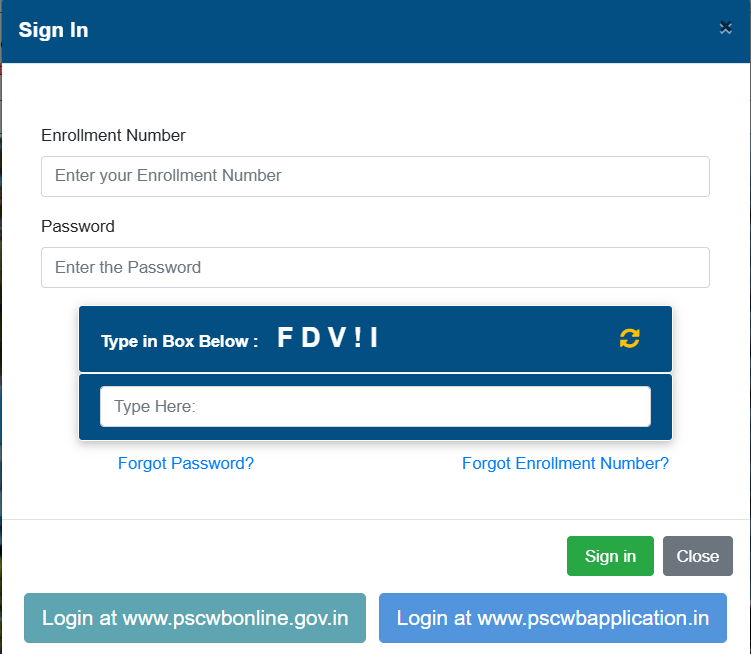
- Type your Enrollment Number.
- Type your Password.
- Look at the code in the blue box (“Type in Box Below”). Type the same code in the white box. If you cannot read it, click the small yellow arrow icon to get a new code.
- Click the green Sign in button.
You will also see two blue buttons at the bottom: Login at www.pscwbonline.gov.in and Login at www.pscwbapplication.in. Use the one that the job advertisement or the website tells you to use.
Step 4: Find the Job and Fill the Application Form
Open the Current Application page on the WBPSC website. There you will see a list of all open jobs. Each row shows the Advt No. (advertisement number), the job name, the start date and the end date. Click the download icon to read the full notice.
Read the notice slowly before you apply. Check the age limit, education needed and last date. The WBPSC says that submitting the form does not mean you are eligible. If you do not meet the rules, your application can be rejected at any time.
Not sure which job to choose? See the latest posts in our West Bengal jobs list. For example, you can read about the WBPSC Clerkship notification, the WBPSC English Stenographer recruitment and the WBPSC Sub Surveyor recruitment.
Now fill the form with care. Keep your documents near you. Check each answer two times. Upload photo and signature if the form asks for them.
Step 5: Submit and Save Your Printout
After you click Submit, a page will show your Registration No. and Password for that application. Write them down. You will also get them by SMS, if your mobile number is correct.
Then use the Re-Print Application option to download your form. Save the PDF in your phone and take a paper printout also. If you cannot get the printout, your application was not saved. In that case, apply again.
After You Apply: Admit Card, Call Letter and Answer Key
The same website has pages for everything that comes after the application:
- Admit Card (Written / Screening Test): Find your Advertisement Code in the list and click the link to download.
- Call Letter (Interview / Personal Test): Use this page when you are called for the interview. See an example of a schedule in our WBCS Group D personality test post.
- Answer Key Response: After the exam, check this page if the WBPSC opens it for your exam.
If a list says “No data available”, it only means nothing is published for now. Check again later. Also start your exam preparation early. For example, see the WBPSC Clerkship syllabus and the English Stenographer syllabus.
8 Simple Tips to Avoid Mistakes
- Register only once. Never make a second account.
- Use your own mobile number. Do not use a cyber cafe number.
- Write your name exactly as in the Madhyamik certificate.
- Keep your Enrollment Number and password safe.
- Do not wait for the last day. The website becomes slow when many people apply together.
- If the page is slow, wait 15 minutes and try again, or try at night.
- Do not share your password with anyone.
- Always download and keep the application printout.
Frequently Asked Questions (FAQ)
How do I know my WBPSC application is saved?
After you submit, the page shows a Registration No. and Password. To be sure, open the Re-Print Application page and get your printout. If the printout opens, your form is saved.
I did not get the SMS. What should I do?
The SMS goes to the mobile number you entered. If that number was wrong, you may not get it. Use the Forgot Enrollment Number or Forgot Password link on the login box, or write to the WBPSC help email.
I got a blank or zero Registration No. What now?
This is rare. The WBPSC advises you to apply again and then check the printout through the Re-Print Application option.
My internet stopped after I filled the full form. Is it saved?
Check by trying to get the printout. If you cannot get it, your application is not saved, so please apply again.
What details do I send if I write to WBPSC about a problem?
Send your Registration No., Password, Date of Birth and full name as in the application. Also attach a screenshot of the error.
Can I apply for more than one WBPSC exam with one account?
Yes. You register one time only. Then you can log in and apply for different jobs whenever they open.
Final Words
Applying to WBPSC is simple when you go step by step: register once, log in, choose the job, fill the form, submit and save the printout. Bookmark this page, because the steps stay the same for every exam. To see new vacancies, visit our West Bengal jobs page and the WBPSC recruitment page. Always check the official website psc.wb.gov.in for the final rules.