
SPSC Sikkim RPA 3.0 Portal -The Sikkim Public Service Commission (SPSC) has officially upgraded its online recruitment system to the Recruitment Process Application (RPA) Version 3.0. This new RPA portal is designed and developed by the National Informatics centre for accepting all online application for all Government Jobs in Sikkim from a single portal to make it easier for candidates to apply Jobs , track job status and download admit cards form single portal. In this article I will try my best to explain all the details about the new RPA Portal so that it will be easier for you to understand while applying for the Jobs .I suggest all the candidates to read the entire article to understand properly about the new SPSC Sikkim RPA 3.0 also known as the new RPA Portal 3.0, the online recruitment application for Government Jobs in Sikkim which is accessible at spscrecruitment.sikkim.gov.in.
[Updated on 15th June 2026 ] Check this Latest Notification by Sikkim Public Service Commission – SPSC Accounts Clerk / Junior Storekeeper Recruitment 2026
If you are looking for Government Jobs in Sikkim , the latest SPSC recruitment 2026 or planning to apply for any future vacancies in Sikkim, you must complete the new registration process at spscrecruitment.sikkim.gov.in. SO lets continue understating the details in this blog post.
You might also like to Read and apply MAYFAIR Hotels & Resorts Recruitment 2026 (Vacancies for Sikkim, Siliguri , Darjeeling and Kalimpong)
What is the SPSC RPA 3.0 Portal?
Before staring the registration details let us understand the RPA 3.0 portal, it is a newly launched official recruitment platform by the Sikkim Public Service Commission. The primary goal of this upgrade by SPSC (Sikkim Public Service Commission) is to implement a One-Time Registration (OTR) system. This means once you create and verify your profile at Sikkim Recruitment Processing Application (RPA), you can apply for any advertised position in the future by SPSC with just a single click.
SPSC Sikkim RPA 3.0 Portal-Key Instructions for SPSC Candidates
To ensure a smooth transition to the new RPA system, all candidates—including those who have applied for Sikkim Govt jobs previously—must follow these steps:
- Mandatory Re-registration: Every candidate intending to apply for SPSC posts must complete the OTR on the RPA 3.0 portal.
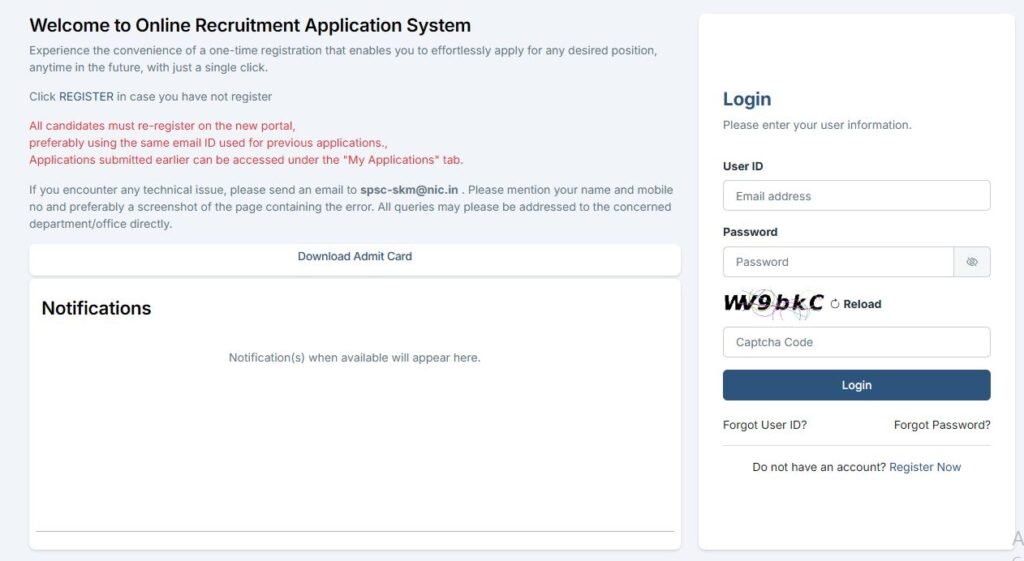
- Use Previous Email ID: If you have registered on the old SPSC portal, it is highly recommended to use the same email ID for the new registration. This allows the system to link your previous applications and records automatically.
- Data Migration: By using your old email address, your past records will be migrated to the new system, appearing under the “My Applications” tab.
- Careful Review: Before submitting your OTR, read all instructions on the portal carefully, as this data will be used for all future job applications in Sikkim.
We will discus the process step by step-
Read and apply for this latest Sikkim Job- Sikkim Recruitment 2026
Step-by-Step Guide for SPSC Sikkim RPA 3.0 Registration
Here is the cleaned-up, step-by-step guide for the SPSC recruitment registration and application process.
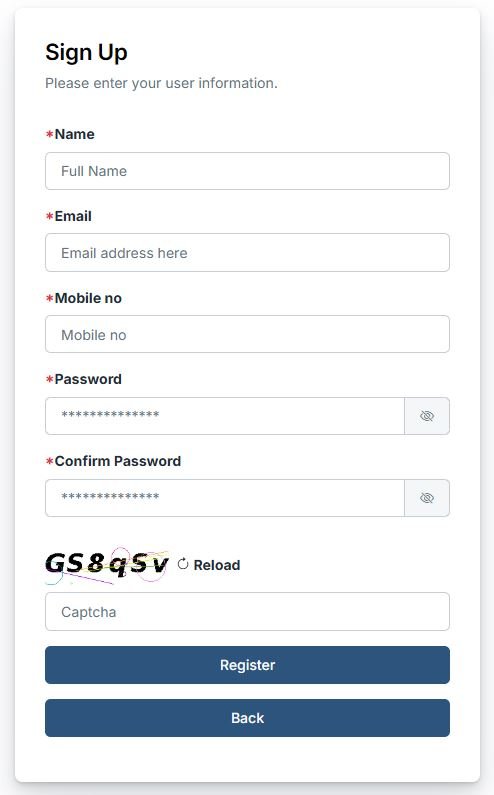
Step 1: Registration
- Navigate to the SPSC Sign-Up Page. : Click Here for SPSC RPA 3.0 Official Registration
- Enter your user information:
- Full Name
- Email Address
- Mobile Number
- Create and Confirm Password
- Enter the Captcha and click the Register button.
Step 2: Email Verification
- Check your registered email for an OTP.
- Enter the OTP on the website and fill in the new Captcha.
- Click Register again to finalize.
- Once the “Registration Successful” message appears, click Login Now.
Step 3: Profile Update (9-Step Process)
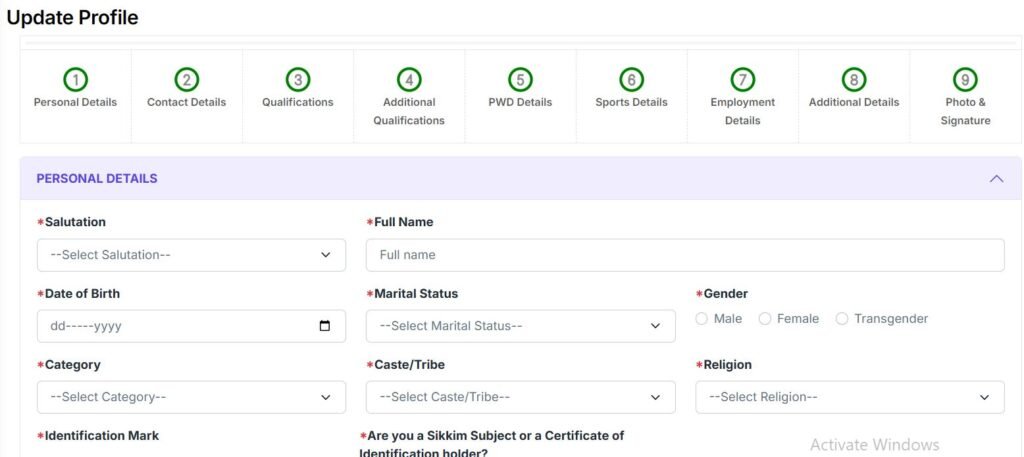
Before applying for a post, you must complete your profile. You will need to fill out the following nine sections:
- Personal Details
- Contact Details
- Qualifications
- Additional Qualifications
- PWD Details (if applicable)
- Sports Details (if applicable)
- Employment Details
- Additional Details
- Photo & Signature (Upload your recent passport-size photo and signature).
Step 4: Applying for a Vacancy
- Once your profile is 100% complete, look at the Left Sidebar.
- Click on the Apply Now option.
- A grid of available vacancies will be displayed based on your eligibility.
- Select your desired vacancy and click Apply.
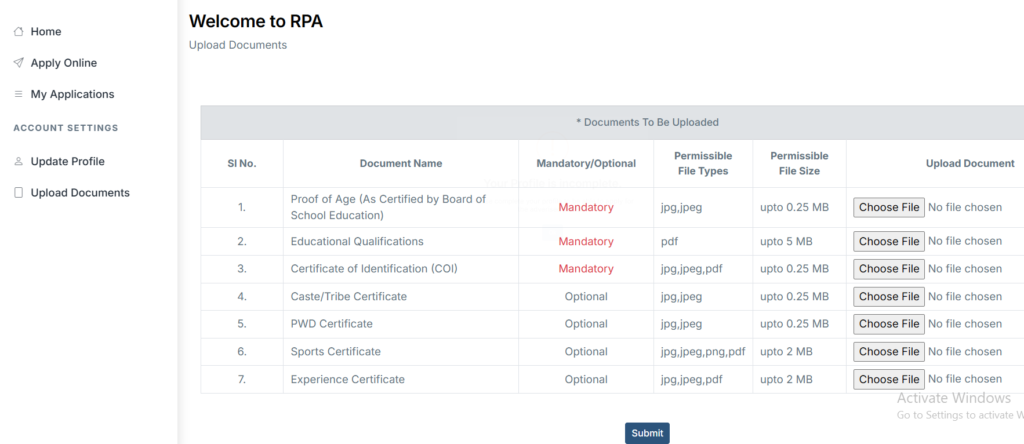
Step 5: Document Upload
You will be required to upload the following 7 documents (as applicable):
- Proof of Age: (e.g., Birth Certificate or Board School Certificate).
- Educational Qualifications: (Mark sheets/Degree certificates).
- Certificate of Identification (COI).
- Caste/Tribe Certificate.
- PWD Certificate (if applicable).
- Sports Certificate (if applicable).
- Experience Certificate (if applicable).
- Click Submit after all documents are attached.
Step 6: Confirm Application Status
- To ensure your application went through, check the Left Sidebar.
- Click on My Applications.
- Your submitted application should be listed here for future reference and tracking.
You might also like to read and apply for this another Sikkim Private Job – Sikkim University Vacancy 2026
SPSC Sikkim RPA 3.0 Portal -Top 10 FAQs
Here are the most common queries candidates have regarding the new Sikkim Job Portal – SPSC Sikkim RPA 3.0 Porta:
1. Is it mandatory to register again if I already have an account on the old SPSC website? Yes, all candidates must complete a one-time registration (OTR) on the new RPA 3.0 portal to apply for any current or future vacancies.
2. What happens to my old application data? If you use the same email ID you used previously, your old records will be migrated and accessible under the “My Applications” tab in the new portal.
3. Can I change my email ID during the new registration? While you can use a new email, it is strongly advised to use your previous one to ensure seamless data migration and avoid duplicate profiles.
4. What should I do if I face technical errors during registration? If you encounter issues, email spsc-skm@nic.in with your name, mobile number, and a screenshot of the error.
5. Is there a fee for the One-Time Registration (OTR)? Registration on the RPA portal is generally free, though specific job applications will still require the prescribed examination fees.
6. Where can I find the latest SPSC job notifications? All new advertisements are posted on the RPA 3.0 portal and the main SPSC website. You can also stay updated via IndiaJobAlerts.com.
7. Can I edit my OTR details after submission? Most details can be updated, but you should ensure high accuracy during the initial setup to avoid complications during the recruitment process.
8. What documents are required for SPSC OTR? Typically, you need a valid ID proof, educational certificates, COI/Sikkim Subject certificate, and category certificates (if applicable).
9. How do I apply for a specific post after registration? Log in to your dashboard, navigate to “Live Advertisements,” and click the “Apply” button next to the desired post.
10. What is the official link for the new SPSC portal? The official link for SPSC Sikkim RPA 3.0 Portal registration
Contact Information for Support for SPSC Sikkim
For any queries related to the Sikkim Public Service Commission Recruitment, you can reach out to:
- Email: spsc-skm@nic.in
- Old Website Reference: https://spsc.sikkim.gov.in/
For the fastest updates on SPSC results, admit cards, and new job openings in Sikkim, keep visiting IndiaJobAlerts.com.

Sandeep Khati is the founder of India Job Alerts and a B.Tech in Computer Science from JGEC (2010). He started his career as a Systems Engineer at TCS and has been active in digital publishing since 2011, beginning with SearchDarjeeling.com(2011) and working as a web developer and designer at Darjeeling Informatics. Launched in April 2025, India Job Alerts is his most focused project — dedicated to publishing verified government and PSU job notifications for West Bengal, Sikkim, and All-India candidates. Every post is cross-checked against official notifications before publishing.. Know more